Building an AI agent from scratch without frameworks
These days there are more agent frameworks than there are LLMs to choose from. Some of the frameworks help, while others just add clutter. The one thing they all have in common is that they abstract away the fundamentals of building agents behind their own implementations and interfaces.
Building with an agent framework can give you speed, power, reliability and more. The problem comes when the framework becomes your crutch. When you forget, or never even learn, the basic building blocks and core principles behind it. That's when you go from someone who knows how agents work to a one-trick pony who only knows how to use a framework.
So let's look behind the curtain, get to know the fundamentals and build ourselves a helpful agent.
The basics
An agent is just a wrapper around an LLM that allows the underlying model to make decisions and take actions (access info, manipulate data, control external systems, etc). There's not much more to it than that.
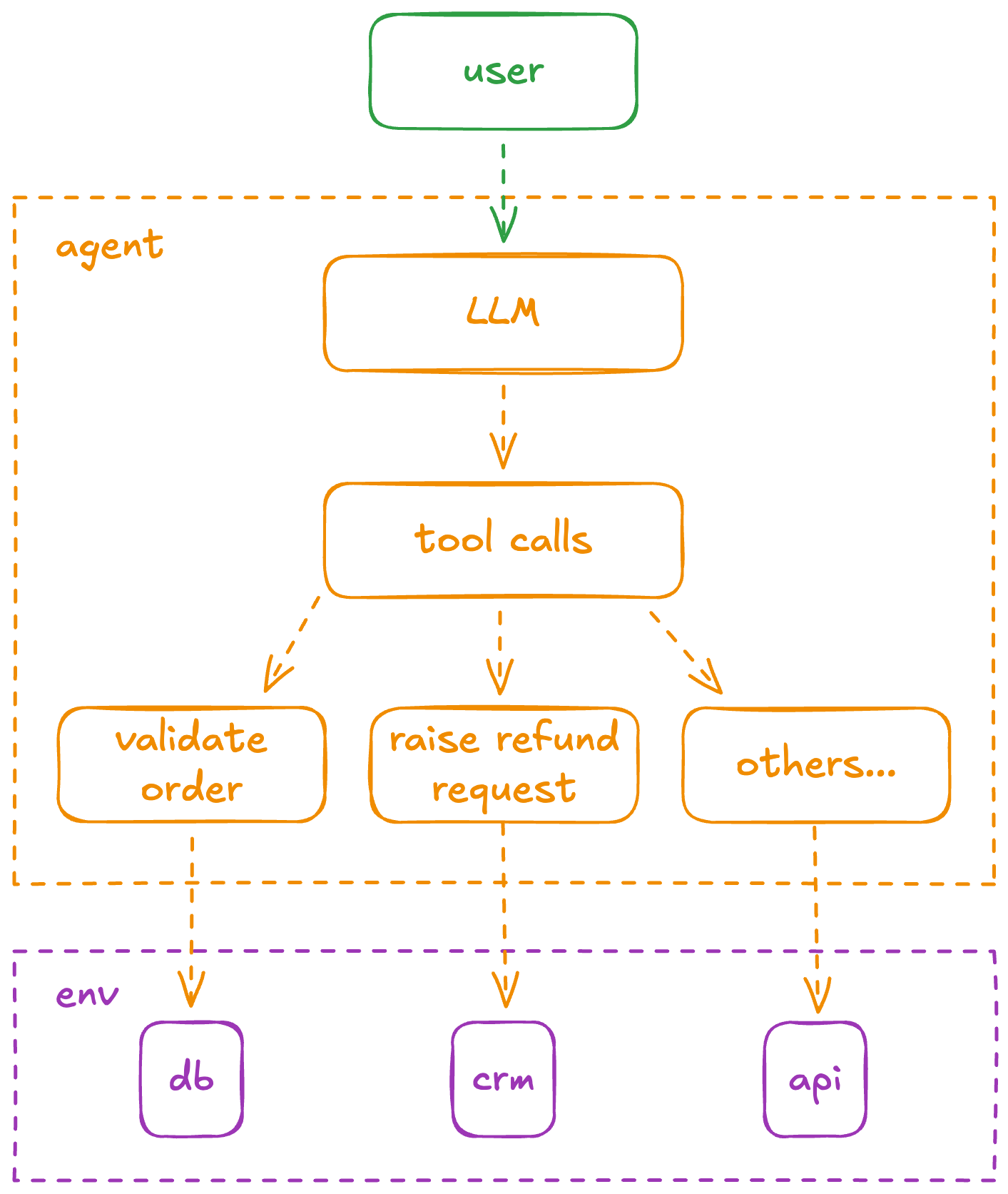
The base of nearly every agent is the same:
- Specify tools: You determine the available tools (e.g.,
identify_order) the model will need to fulfil your request. - Call the LLM: You send the user's prompt and your tool definitions to the model.
- Model brainpower: The model analyzes the request. If a tool is needed, it returns a structured
tool useresponse containing the tool name and arguments. - Execute tool: Your code intercepts the
tool useresponse, executes the actual code or API call, and captures the result. - Respond and iterate: You send the result (the
tool response) back to model. The model uses this new information to decide the next step, either calling another tool or generating the final response.
Everything else is additional layers for convenience and performance:
- Context engineering turns your agent from a jack-of-all-trades to a master-of-some
- Memory makes your agent more relevant and helpful
- Visibility and traceability allow you to monitor performance and spot issues
- Evals let you measure and track quality
These are necessary considerations if you're shipping agents in production and we will get to them in future posts. But for now, let's focus on the fundamentals of building our first agent and giving it some practical tools.
Our support agent
We'll build an online support chat agent that can answer general queries, validate orders and escalate refund requests to an internal team via email.
We'll build it in Typescript and use Google Gen AI SDK to call out to the Gemini models. I'll use Gemini Flash for the code samples but you can slot in your preferred model instead.
We're not going for middleware layers like OpenRouter or the Vercel's AI SDK to keep the example pure by eliminating 3rd-party APIs dependencies.
Baseline
The instructions assume that all files are kept in the same directory for simplicity. Feel free to remodularize and restructure them as you wish but remember to update your imports accordingly.
Set up a new pnpm project in a directory of your choice and add our dependencies.
pnpm init
pnpm add @google/genai @types.node dotenv inquirer
We'll use inquirer to easily read user input from the console.
You need a Gemini API key. Follow this guide to get one if you don't have one already. Then put the API key in a new .env file which should look like:
GOOGLE_API_KEY=__REPLACE_THIS_WITH_YOUR_GOOGLE_API_KEY__.env
Let's keep our prompt in a separate file system-prompt.md to keep things neat.
You are a helpful AI assistant. Answer the user's questions concisely.system-prompt.md
Our baseline implementation will run until the user enters blank input. At each loop iteration we will:
- Read the user's input from the console
- Add the user's input to an ongoing conversation thread
- Call out to a Gemini model to get a response based on the conversation thread
- Add the AI model's response to the conversation thread
- Log the AI model's response so it is displayed in the console
import type { Content } from '@google/genai';
import { GoogleGenAI } from '@google/genai';
import fs from 'node:fs/promises';
import inquirer from 'inquirer';
import 'dotenv/config';

const MODEL = 'gemini-2.5-flash';
const SYSTEM_PROMPT = await fs.readFile('system-prompt.md', 'utf8');
const GOOGLE_GENAI = new GoogleGenAI({ apiKey: process.env.GEMINI_API_KEY });

/**
 * The conversation thread - stores the contents of the current conversation
 */
const THREAD: { contents: Content[] } = {
  contents: [],
};

/**
 * Get user input from the console
 * @returns The user's message
 */
async function getUserInput() {
  const { userMessage } = await inquirer.prompt([
    {
      type: 'input',
      name: 'userMessage',
      message: 'User:',
    },
  ]);
  return userMessage;
}

/**
 * Get a response from the AI model
 * @param userMessage - The user's input message
 * @returns The AI's response
 */
async function getResponseText(userMessage: string) {
  THREAD.contents.push({
    role: 'user',
    parts: [{ text: userMessage }],
  });

  const response = await GOOGLE_GENAI.models.generateContent({
    model: MODEL,
    config: {
      systemInstruction: SYSTEM_PROMPT,
    },
    contents: THREAD.contents,
  });

  THREAD.contents.push({
    role: 'model',
    parts: [{ text: response.text }],
  });

  return response.text;
}

async function main() {
  while (true) {
    const userMessage = await getUserInput();

    if (userMessage?.trim() === '') process.exit(0);

    const responseText = await getResponseText(userMessage);
    console.log(responseText);
  }
}

main();
main.ts
pnpm start will allow you to validate the working loop.
Adding an FAQ
Let's extend our agent by adding allowing it to answer FAQs.
I have seen people do this via custom tools like a checkFaq function. This is not advised for most use-cases. Static content should always be included in the system prompt whenever possible. This eliminates the latency associated with an extra, unnecessary tool call. Static portions of the system prompt can also benefit from efficient prompt caching yielding even more performance benefits.
Let's add some FAQ content to our system-prompt.md
You are a helpful AI assistant. Answer the user's questions concisely.

# Frequently Asked Questions

## What are your business hours?

We are open Monday to Friday, 9 AM to 5 PM.

## How can I contact support?

You can reach us via email at support@example.com or call 1-800-EXAMPLE.

## What is your refund policy?

We offer a 30-day money-back guarantee on all purchases.

## How long does shipping take?

Standard shipping takes 5-7 business days.
Express shipping is available for 1-2 business days.
system-prompt.md
pnpm start and ask a few questions to validate that everything is working.
Validating orders
We'll make our agent even more helpful by allowing it to validate a user's order. To do so we will ask for the user's email address and their order number.
We'll create a new db.ts file to act as our mock/test order database.
type Order = {
  email: string;
  orderTotal: number;
};

const ORDERS: Record<string, Order> = {
  '11111': {
    email: 'jane.doe@email.com',
    orderTotal: 100.0,
  },
  '22222': {
    email: 'john.doe@email.com',
    orderTotal: 200.0,
  },
  '33333': {
    email: 'jane.smith@email.com',
    orderTotal: 300.0,
  },
};

function getOrder(orderId: string): Order | undefined {
  return ORDERS[orderId];
}

export { getOrder };
db.ts
Now we implement our own validateOrder function which will look into this data to see if it can validate/find a matching order. We'll do this in a new file to separate concerns. In this file we will also specify our FunctionDeclaration which will inform the agent about the function's purpose, its input and output.
import type { FunctionDeclaration } from '@google/genai';
import { Type } from '@google/genai';
import { getOrder } from './db.ts';

/**
 * Validate an order by customer email and order ID
 * @param email - The customer email
 * @param orderId - The order ID
 * @returns True if the order is valid, false otherwise
 */
function validateOrder(email: string, orderId: string): boolean {
  console.log(`Validating order: ${email} - order ID: ${orderId}`);
  const order = getOrder(orderId);
  if (order?.email === email) {
    return true;
  }
  return false;
}

/**
 * Function declaration passed to the LLM.
 */
const validateOrderFD: FunctionDeclaration = {
  name: 'validateOrder',
  description: 'Validate an order by customer email and order ID.',
  parameters: {
    type: Type.OBJECT,
    properties: {
      email: { type: Type.STRING },
      orderId: { type: Type.STRING },
    },
    required: ['email', 'orderId'],
  },
};
export { validateOrderFD, validateOrder };
validate-order.ts
We now need to tell the LLM about this amazing new tool it can use to validate orders. We do this by including our FunctionDeclaration in the config.tools property when we call out to the LLM.
# ...
import { validateOrderFD } from './validate-order.ts';
# ...

# ...
  const response = await GOOGLE_GENAI.models.generateContent({
    model: MODEL,
    config: {
      systemInstruction: SYSTEM_PROMPT,
      tools: [{ functionDeclarations: [validateOrderFD] }],
    },
    contents: THREAD.contents,
  });
# ...
main.ts
Now the LLM knows it can use this new tool but we still need to handle what happens when it decides to actually use it.
If an LLM decides to invoke a custom tool, it will populate the functionCalls property of the response object. We therefore need to update our response handling accordingly.
- Inspect
response.functionCallsfor any tool call invocations - Invoke our custom function based on the parameters passed by the LLM
- Communicate response back to the LLM
  # ...
  import type { Content } from '@google/genai';
  # ...

  # ...
  const response = await GOOGLE_GENAI.models.generateContent({
    model: MODEL,
    config: {
      systemInstruction: SYSTEM_PROMPT,
      tools: [{ functionDeclarations: [validateOrderFD] }],
    },
    contents: THREAD.contents,
  });

  // parse out and handle the function calls
  const functionCalls = response.functionCalls || [];
  for (const functionCall of functionCalls) {
    if (functionCall.name === 'validateOrder') {
      const { email, orderId } = functionCall.args as {
        email: string;
        orderId: string;
      };
      const isValid = validateOrder(email, orderId); //call our function

      // add the function call response to the conversation thread
      const function_response_part = {
        name: functionCall.name,
        response: { result: isValid },
      };
      THREAD.contents.push(response?.candidates?.[0].content as Content);
      THREAD.contents.push({
        role: 'user',
        parts: [{ functionResponse: function_response_part }],
      });

      // ask the LLM for a final generation
      const final_response = await GOOGLE_GENAI.models.generateContent({
        model: MODEL,
        contents: THREAD.contents,
        config: {
          systemInstruction: SYSTEM_PROMPT,
          tools: [{ functionDeclarations: [validateOrderFD] }],
        },
      });
      return final_response.text;
    }
  }
main.ts
Escalation process
Next we'll give our agent the ability to raise a refund request a thread by implementing a new custom function raise-refund-request.ts
import type { Content, FunctionDeclaration } from '@google/genai';
import { Type } from '@google/genai';

/**
 * Raise a refund request for an order.
 * @param orderId - The order ID
 * @param reason - The reason for the refund request
 * @param contents - The contents of the conversation thread
 */
function raiseRefundRequest(
  orderId: string,
  reason: string,
  contents: Content[],
): void {
  console.log(`!!! Raising refund request for order: ${orderId}: ${reason}`);
  // TODO: In a more realistic scenario, we would send an internal email to
  // customer support or call a backend API to raise a refund request.
}

/**
 * Function declaration passed to the LLM.
 */
const raiseRefundRequestFD: FunctionDeclaration = {
  name: 'raiseRefundRequest',
  description: `Raise a refund request for an order. Before calling this fuction,
    always make sure to validate the customer order ID and also confirm with the
    user that they want to raise a refund request for the order.
    DO NOT RAISE REFUND REQUESTS FOR ORDERS THAT HAVE NOT BEEN VALIDATED SUCCESSFULLY.`,
  parameters: {
    type: Type.OBJECT,
    properties: {
      orderId: { type: Type.STRING },
      reason: { type: Type.STRING },
    },
    required: ['orderId', 'reason'],
  },
};

export { raiseRefundRequest, raiseRefundRequestFD };
Our current implementation simply logs a special message to the console, but you can easily expand on this to do something else instead: send an email or Slack message etc.
We wire this up with the LLM by including our new function definition in the config.tools and handling what happens when the model decides to call it.
# ...
  for (const functionCall of functionCalls) {
    THREAD.contents.push(response?.candidates?.[0].content as Content);
    if (functionCall.name === 'validateOrder') {
      # ... // handling what happens when validateOrder is called
    }
    if (functionCall.name === 'raiseRefundRequest') {
      const { orderId, reason } = functionCall.args as {
        orderId: string;
        reason: string;
      };
      raiseRefundRequest(orderId, reason, contents: THREAD.contents);
      const function_response_part = {
        name: functionCall.name,
        response: { result: true },
      };
      THREAD.contents.push({
        role: 'user',
        parts: [{ functionResponse: function_response_part }],
      });
      // ask the LLM for a final generation
      const final_response = await GOOGLE_GENAI.models.generateContent({
        model: MODEL,
        contents: THREAD.contents,
        config: {
          systemInstruction: SYSTEM_PROMPT,
          tools: [{ functionDeclarations: [validateOrderFD, raiseRefundRequestFD] }],
        },
      });
      return final_response.text;
    }
  }
pnpm start and give it a go. If you request refund, the agent will first ask for the information required to validate your order, and a reason for your refund. The agent will only raise a refund if valid order details, and a reason, have been provided.
A bit of refactoring
Let's clean up the code a little and eliminate the duplication around the way we handle the final LLM generation.
- We'll create a new
sendFunctionResponseToLLMfunction which will take our function's response, send it back to the LLM and return the LLM's final generation response. - We'll also make the
userMessageparameter of ourgetResponseTextfunction optional so we can replace the final LLM generation step with a simple call togetResponseTextafter we have added the function call's response to theTHREAD
Our final main.ts file should look like this:
import type { Content, FunctionResponse } from '@google/genai';
import { GoogleGenAI } from '@google/genai';
import fs from 'node:fs/promises';
import inquirer from 'inquirer';
import 'dotenv/config';
import { validateOrder, validateOrderFD } from './validate-order.ts';
import { raiseRefundRequest, raiseRefundRequestFD } from './raise-refund-request.ts';

const MODEL = 'gemini-2.5-flash';
const SYSTEM_PROMPT = await fs.readFile('system-prompt.md', 'utf8');
const GOOGLE_GENAI = new GoogleGenAI({ apiKey: process.env.GEMINI_API_KEY });

/**
 * The conversation thread - stores the contents of the current conversation
 */
const THREAD: { contents: Content[] } = {
  contents: [],
};

/**
 * Get user input from the console
 * @returns The user's message
 */
async function getUserInput() {
  const { userMessage } = await inquirer.prompt([
    {
      type: 'input',
      name: 'userMessage',
      message: 'User:',
    },
  ]);
  return userMessage;
}

/**
 * Get a response from the AI model
 * @param userMessage - The user's input message
 * @returns The AI's response
 */
async function getResponseText(userMessage?: string) {
  if (userMessage) {
    THREAD.contents.push({
      role: 'user',
      parts: [{ text: userMessage }],
    });
  }

  const response = await GOOGLE_GENAI.models.generateContent({
    model: MODEL,
    config: {
      systemInstruction: SYSTEM_PROMPT,
      tools: [{ functionDeclarations: [validateOrderFD, raiseRefundRequestFD] }],
    },
    contents: THREAD.contents,
  });

  // parse out and handle the function calls
  const functionCalls = response.functionCalls || [];
  for (const functionCall of functionCalls) {
    THREAD.contents.push(response?.candidates?.[0].content as Content);
    if (functionCall.name === 'validateOrder') {
      const { email, orderId } = functionCall.args as {
        email: string;
        orderId: string;
      };
      const isValid = validateOrder(email, orderId); // call our function
      // ask the LLM for a final generation
      const final_response = await sendFunctionResponseToLLM({
        name: functionCall.name,
        response: { result: isValid ? 'Order is valid' : 'Order is invalid' },
      });
      return final_response;
    }
    if (functionCall.name === 'raiseRefundRequest') {
      const { orderId, reason } = functionCall.args as {
        orderId: string;
        reason: string;
      };
      raiseRefundRequest({ orderId, reason, contents: THREAD.contents });
      // ask the LLM for a final generation
      const final_response = await sendFunctionResponseToLLM({
        name: functionCall.name,
        response: { result: true },
      });
      return final_response;
    }
  }

  THREAD.contents.push({
    role: 'model',
    parts: [{ text: response.text }],
  });
  return response.text;
}

async function sendFunctionResponseToLLM(functionResponse: FunctionResponse) {
  THREAD.contents.push({
    role: 'user',
    parts: [{ functionResponse: functionResponse }],
  });
  const response = await getResponseText();
  return response;
}

async function main() {
  while (true) {
    const userMessage = await getUserInput();

    if (userMessage?.trim() === '') process.exit(0);

    const responseText = await getResponseText(userMessage);
    console.log(responseText);
  }
}

main();
Summary
We stripped back the layers of abstraction and dove into the core mechanics of AI agents. Instead of relying on off-the-shelf frameworks, we built a functional support agent from the ground up, demonstrating that an agent is fundamentally a decision-making wrapper around an LLM.
We started with a basic setup, learned how to effectively use system prompts for static content like FAQs, and then enhanced our agent's capabilities by implementing custom tools for dynamic tasks. This fundamental knowledge is crucial for debugging, optimizing, and building more sophisticated and reliable AI agents in your own projects.
The complete code for this baseline agent is available on GitHub.
What's next?
Our current agent is a great starting point, but there are many more aspects to consider before we deploy it to production users.
We'll improve our agent's capabilities and expand our knowledge further by covering these in future posts.
- Real-world escalation comms: Our
raiseRefundRequestfunction currently just logs to the console. The next logical step is to integrate with a real email service (via NodeMailer, SendGrid, or a simple SMTP client) or messaging service (Slack, Teams) to communicate refund request emails to an internal support team. - Persistent storage for orders: Our
db.tsuses a simple in-memory object for orders. For a production-ready agent, you'd want to connect to a proper database (SQL, NoSQL, etc.) to store and retrieve order information. - Memory for longer conversations: Our
THREADobject provides basic short-term memory. Explore more sophisticated memory management techniques (e.g., summarizing past interactions, using vector databases for conversational history) to give your agent a longer and more relevant memory. - Token-limit triage: Consider managing the conversation history size by dropping or summarizing the oldest messages when the context window is near its limit, ensuring the agent doesn't fail on long chats.
- More tools and integrations: Think about other external systems your support agent might interact with like a CRM system or a real-time API for shipping updates, etc.
- Visibility and traceability: Implement logging and monitoring tools to track your agent's performance, identify common user queries, and quickly diagnose issues. This is crucial for understanding how your agent is being used in the real world.
- Evaluation and quality metrics: How do you know if your agent is doing a good job? Set up evaluation metrics and processes to quantitatively measure the quality and effectiveness of its responses and actions.
- Error handling and user feedback: Improve the handling of edge cases and provide clearer feedback to users when things don't go as expected (e.g., "Sorry, I couldn't find that order.").
Tackling these enhancements will allow you to deepen your understanding of the complexities involved in building robust, production-grade AI applications.